
Originally published November 2019, updated May 2026
You hate unit testing. You know you do. And you probably feel a little better about it because everyone around you hates it too. You gave it a fair shot. You wrote the tests. You ran them. And then you spent the next six months fighting them instead of fighting bugs. So you declared the whole thing more trouble than it was worth and moved on.
(If you prefer video, check my rant on YouTube)
Here’s the inconvenient truth: you weren’t doing it wrong because unit testing is hard. You were doing it wrong because you were making a handful of very specific, very fixable mistakes. And those mistakes turn an extremely valuable practice into an exercise in futility.
The Real Problem Isn’t Writing Tests
There’s a recurring blame game in software development around unit testing. Testers think it’s a developer problem because the tests are code. Developers think it’s a testing problem because, well, it has the word ‘testing’ in it. Meanwhile, nobody does it well and the whole team suffers for it.
The truth is that developers need to own unit testing. Not because it’s fair, but because unit tests are tightly coupled to implementation details that only the developer writing the code actually understands. No tester is going to know that your function has three specific edge cases that only manifest under very particular conditions.
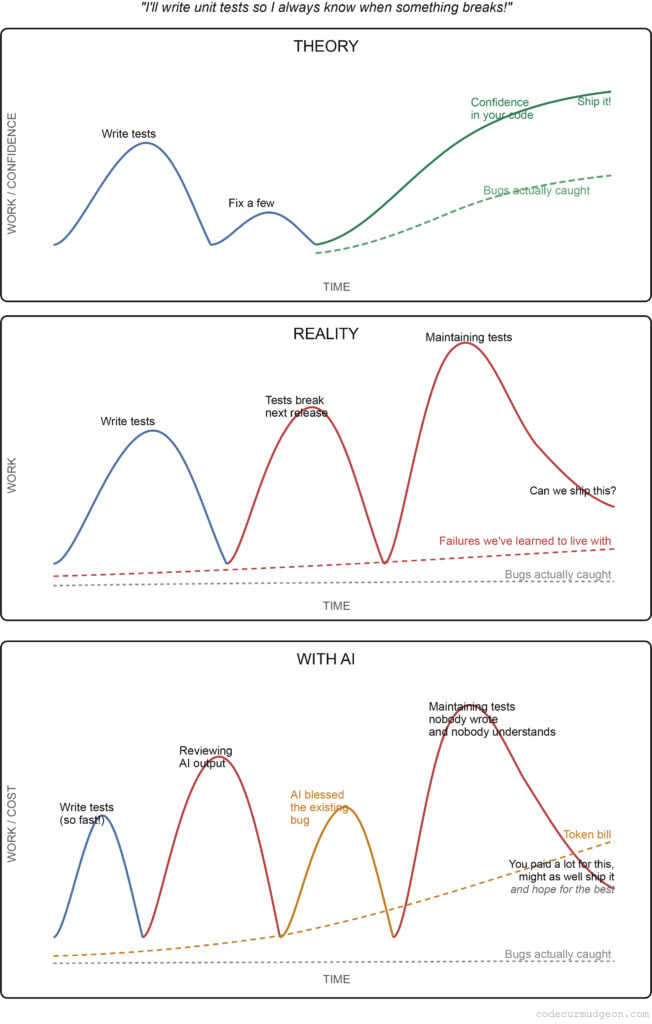
But here’s the thing developers consistently get wrong: the hard part isn’t writing unit tests. The hard part is keeping them working. Every release cycle, a few more tests break. Some of those failures are real problems. A lot of them are just noise. And over time, the noise starts to drown out the signal.
You start at 2% failure. That seems manageable. Then 5%. Still okay. Then 10%, 15%. And somewhere in that drift, you stop asking whether the failures are real and start treating failure as the normal state of your test suite. That’s when the whole thing becomes useless.
A Test Suite That Won’t Give You a Straight Answer
My brother and I were working together years ago, and he built a little test harness to run our suite. It would summarize the run at the end with a judgment: 90%+ success, ship it. 75-90%, you better take a look first. Below 70%, somebody needs to get fired. It was meant as a joke. Mostly.
The point was that you need a binary answer out of your test suite. Not a vague sense that things are probably fine. Go or no-go. And in a world of continuous integration and automated deployment, that’s not optional anymore. You can’t have a human sitting in the middle of your pipeline squinting at test results trying to decide if a failure is a real defect or just the noise they’ve gotten used to and stopped worrying about. The whole point of automation is that the decision gets made for you, reliably.
A noisy test suite makes that impossible. If you can’t trust the results, you don’t have a test suite. You have a very expensive, very annoying spreadsheet.
Mistake #1: Bragging About Test Count Instead of Coverage
Ask most teams how good their unit testing is and they’ll say something like, ‘We have 20,000 tests.’ That number is meaningless. I don’t know if that’s impressive or wasteful without knowing what those tests actually cover.
If 20,000 tests cover 15% of your application, you’ve got a lot of tests covering very little ground. If they cover 300% of your application, you’ve built an enormous amount of redundant infrastructure that has to be maintained every time anything changes. Neither is good.
Code coverage isn’t a perfect quality metric. High coverage doesn’t guarantee good tests. But low coverage is a meaningful signal in the other direction: if large portions of your application aren’t touched by your test suite, you’re shipping code you’ve never validated. At that point, the question isn’t whether your unit testing is good. The question is whether you’re actually unit testing at all.
Mistake #2: Tests That Don’t Assert Anything
I’ve had this argument with developers more than once, and I’ll keep having it: a unit test without an assertion is not a unit test. It’s just code execution.
The logic I keep hearing is: ‘The test runs the code, and if it doesn’t crash, it passes.’ That’s a remarkably low bar. ‘Didn’t crash’ is not the same as ‘works correctly.’ There are entire categories of bugs that will happily run to completion and return a wrong answer. Without an assertion checking that answer, your test will pass right through them.
A meaningful unit test should tell you one of three things. First, this functionality works correctly, because I checked. Second, this functionality is broken, because it failed a check I wrote specifically for it. Third, this test failed and I’m not sure if it’s a real problem yet, but I know exactly where to look.
That third case is important. Far too many organizations spend weeks going from a test failure to an actual remediation, mostly because the failure gives them no useful information. Good assertions eliminate most of that investigation time. You know what broke, you know why it matters, and you know where to go fix it.
Mistake #3: Getting Comfortable With Failure
This is the one that really kills teams. They’ve had a 10% failure rate in their test suite for two years. Or five. Or ten. The failures are ‘legacy’ failures. They’ve always been there. They ship with them. And as long as the number doesn’t go to 11%, everything is fine.
It’s not fine. Here’s why. When you’re carrying a 10% baseline failure rate, you lose the ability to detect new failures. Suppose you fix a few old broken tests this sprint, dropping 1%. But you also introduced 1% new failures somewhere else. From the outside, the number looks the same. The old chronic failures masked the new real ones. You just shipped a defect that your test suite technically detected and you completely missed.
Think of running a spell check for the first time on a highly technical document. Every domain-specific term gets flagged. There are so many red underlines that you stop seeing them, and the actual typos blend right in. A permanently noisy test suite works exactly the same way.
The Fix Nobody Wants to Hear: Turn Off the Tests You’re Ignoring
Teams have a strange attachment to failing tests. I’ll suggest turning off the ones that have been failing for years, that everyone knows fail, that nobody investigates, and the reaction is horror. ‘We can’t turn those off. They might be important someday.’
Walk through the logic with me. Those tests are failing. The failures are, by your own admission, not indicating real problems. So they’re not catching bugs. They’re not gating releases. They’re not giving you actionable information. What exactly are they doing for you?
A test that always fails and gets ignored is functionally identical to a test with no assertion. Neither one is catching anything. The difference is that the always-failing test is also polluting your results and making it harder to find the failures that actually matter.
Before you turn them off, check your coverage numbers. If disabling a batch of broken tests causes your coverage to drop significantly, that’s information. You may have application code that genuinely isn’t being tested by anything healthy. You’ll want to address that. But if coverage stays roughly the same, you’ve confirmed those tests weren’t doing real work. Turn them off. Clean up the suite. Start from a clean baseline.
Your new coverage number will be lower. It will also be honest. And an honest lower number is worth a lot more than an inflated number you can’t trust.
You Don’t Hate Unit Testing. You Hate Doing It Wrong.
Unit testing done right is one of the most cost-effective things you can do for software quality. The reason so many teams hate it is that they’ve accumulated bad habits that turned their test suite into a liability instead of an asset. Tests without coverage measurement. Tests without assertions. A growing baseline of accepted failures that slowly poisons the entire signal.
Fix those things and the suite becomes something you can actually use. It tells you when to ship and when to stop. It catches regressions before they reach users. It gives new developers a safety net when they touch unfamiliar code.
That’s not annoying. That’s the job working correctly.
2026 Update: What AI Changes (and What It Doesn’t)
I wrote the above a few years ago. The core argument hasn’t changed. But AI has entered the picture in ways that are worth addressing directly, because some of what AI offers is genuinely useful, some of it is a new way to make the same old mistakes faster, and a few things are surprisingly good that most people haven’t figured out yet.
AI Makes It Easy to Generate Tests. That’s Not Entirely Good News.
You can now point an AI at a class and get a hundred unit tests in about thirty seconds. This sounds like a solution to the problem of not having enough tests. In practice, it often just automates the bad habits described above.
The coverage theater problem gets worse. AI will happily generate tests that touch every line of code without validating any of the logic behind it. Your coverage numbers go up. Your confidence in the software shouldn’t.
The assertion problem gets subtler. AI-generated tests tend to assert what the code currently does rather than what it should do. If there’s a bug in the code, there’s a good chance the generated test encodes the buggy behavior as the expected result. The test passes. The bug ships. This is worse than a missing assertion because it gives you false confidence backed by a green checkmark.
The maintenance problem gets harder. Tests written by a developer have intent baked in. When something breaks, the developer who wrote the test often knows immediately whether the failure is real or an artifact of implementation drift. AI-generated tests have no such intent. Nobody knows why that test was written that way. When it breaks, you’re back to the two-week remediation problem, except now you’re also not sure if the test was meaningful to begin with.
There’s also a cost dimension that catches teams off guard at scale. Running AI in agentic loops against a large codebase burns tokens fast, and most teams don’t discover how fast until the bill arrives. I wrote about this in detail separately — if you’re planning to use AI for test generation at any meaningful scale, read that first: Avoiding Unexpected Costs: Token Tax in LLM-Based Unit Testing
Where AI Actually Helps: Triage and Remediation
The more interesting application, and the one people are underusing, is feeding AI your failing tests rather than asking it to generate new ones.
Give an AI a failing test, the code it covers, and the assertion that’s failing, and it can often tell you within seconds whether the failure looks like a real defect, a brittle test that broke due to implementation drift, or a test that was never checking anything meaningful to begin with. That’s the two-week investigation problem compressed into a prompt.
It’s also reasonably good at suggesting remediation. Not always right, and you still need a developer in the loop to validate the fix, but it dramatically shortens the time from ‘this test failed’ to ‘here’s what to do about it.’ For teams drowning in a legacy test suite with a high chronic failure rate, this is a more practical application of AI than test generation.
The Underrated Use Case: Identifying Tests to Kill
I argued earlier that you should turn off tests that are always failing and getting ignored. AI is surprisingly useful for making that call systematically.
Feed it a set of consistently failing tests along with the code they’re supposed to cover and ask it to evaluate whether each test is catching a real condition or just mirroring an implementation detail that’s drifted. It won’t be right every time, but it gives you a fast first pass to separate the tests worth fixing from the ones worth deleting. That’s cleaning up the suite at a pace that would have taken months to do manually.
The underlying principle hasn’t changed: a test suite you can trust beats a test suite that looks impressive. AI doesn’t change that. It just gives you new ways to either undermine it or accelerate toward it, depending on how you use it.